

Провода вспомогательных контактов MCCB: NO, NC, COM и подключения PLC
To wire an MCCB auxiliary contact, connect an external control supply through the contact path that closes in the breaker state you want to indicate, then to the lamp or compatible PLC input. For a typical positive-switched 24 V DC input, the path is +24 V → auxiliary contact COM → selected output → PLC input, with the input-group common connected to 0 V. Identify the actual terminals from the accessory diagram before making connections.
MCCB auxiliary contact wiring carries the monitoring-circuit current, not the breaker’s load current. The contact acts as a switch; it does not generate voltage. The examples below show how to turn that switching action into a useful ON/OFF indication and how to check the result when replacing an accessory.
What Should the Auxiliary Contact Indicate?
Begin with the message the panel must display. “Breaker closed,” “breaker open” and “breaker tripped” are not interchangeable signals.
A position auxiliary contact normally follows the breaker’s documented operating position. It can provide a remote ON or OFF indication, depending on which contact path is used. It does not, by itself, prove why the breaker opened. If the monitoring system must distinguish a protection trip from an intentional shutdown, it also needs the appropriate trip indication. The functional boundary is explained in MCCB auxiliary contact vs alarm contact.
Write the required message as a true statement before drawing the circuit. For example:
- “BREAKER CLOSED” lamp ON: the MCCB is in its documented closed position; choose the lamp color to suit the panel convention.
- PLC input TRUE: the MCCB closed-position signal path is complete.
- Red lamp ON: a separate alarm contact indicates a covered trip event.
This wording prevents a common design error: labeling every open-position signal as “TRIP.” A breaker may be open because an operator switched it off, a motor operator opened it, or a trip mechanism operated. Position feedback alone cannot separate those causes.
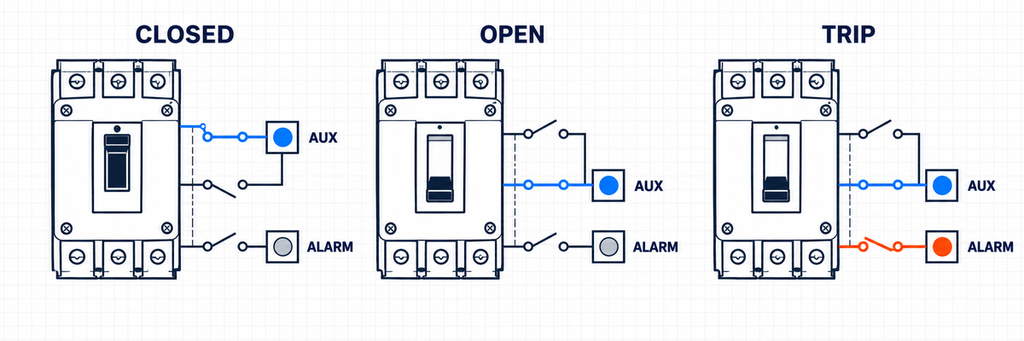
MCCB closed, open and tripped states showing position feedback separately from trip indication.What Do COM, NO and NC Mean?
A changeover contact has one moving common terminal and two alternative paths:
- COM (common): the moving side shared by the two paths.
- NC (normally closed): connected to COM in the stated normal or reference condition.
- NO (normally open): disconnected from COM in that same condition and connected after the mechanism changes state.
The word normally is only useful when the reference condition is known. Depending on the accessory and its documentation, the drawing may show the breaker open, reset, closed, tripped, uninstalled or with the actuator released. Do not assume that NC always means “breaker OFF” or that NO always closes when an MCCB is ON.
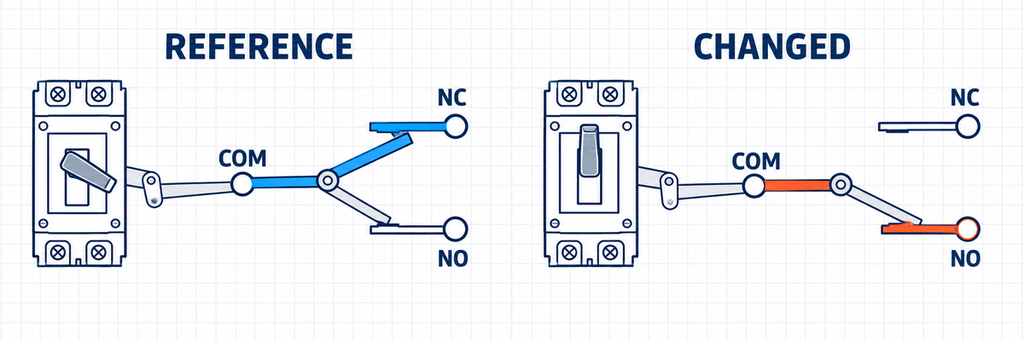
Changeover auxiliary contact showing COM connected to NC in the reference state and to NO after the mechanism changes.Likewise, do not transfer terminal numbers from another brand or breaker family. Numbering such as 11–12–14 may be familiar in control equipment, but an MCCB accessory can use a different scheme, flying leads, a connector or a model-specific terminal block. Wire colors are also not a universal identification method.
The dependable sequence is:
- Identify the exact breaker family, frame and accessory reference.
- Find the contact diagram and its stated mechanical condition.
- Identify COM, NO and NC from that diagram.
- With the equipment isolated, confirm the expected continuity changes before connecting the receiving circuit.
A continuity test can confirm which conductors change together, but it cannot prove that an unmatched accessory will operate correctly after installation. Mechanical engagement still has to be verified.
Wiring caution: contact COM is not PLC input common. Contact COM is the common pole of the mechanical switch. PLC input common is the electrical reference for an input group. In the positive-switched example below, contact COM connects to +24 V and PLC input common connects to 0 V: joining them directly would short the control supply. Identify their functions from the circuit, not from the shared word “common.”
Match the Contact to the Receiving Circuit
The same changeover contact may be able to feed a lamp, an interposing relay or a PLC input, but those loads do not behave alike. The receiving device determines the sensing voltage, current, polarity and common connection.
| Receiving circuit | What the auxiliary contact does | What must be checked | Typical design mistake |
|---|---|---|---|
| Indicator lamp | Completes or opens the lamp supply path | Lamp voltage, steady current, inrush where applicable, contact duty and desired ON/OFF message | Assuming the contact supplies power to the lamp |
| Interposing relay | Switches the relay-coil circuit | Coil voltage, AC/DC type, pickup current and suppression arrangement | Checking only the relay’s holding current and ignoring switching duty |
| PLC or BMS digital input | Routes an external sensing supply to or from the input | Input type, ON/OFF thresholds, input current, polarity, common/reference and minimum contact load | Copying a generic 24 V diagram without checking the input module |
Example 1: a 24 V DC breaker-closed indicator
For a simple closed-position lamp, the selected auxiliary path is placed in series with a correctly rated lamp and its external supply. The circuit should be designed from the required indication: if the lamp must illuminate when the breaker is closed, select the path that is closed in that documented breaker state.
Illustrative connections: protected +24 V DC supply → contact COM → contact output that closes with the MCCB → 24 V DC lamp positive terminal. Connect the lamp negative terminal to supply 0 V. Use a lamp assembly rated for direct connection to 24 V DC, not an unprotected bare LED.
Assume that this accessory’s diagram identifies its NO path as closed when the installed breaker is ON. COM–NO then supplies the “BREAKER CLOSED” lamp. When the breaker opens, that path opens and the lamp goes out. If an open-position lamp is required as well, COM–NC can feed a second correctly rated lamp from the same supply, provided the documented contact operation supports it. Label the lamps by position; an open-position lamp does not identify a trip.
Choose the supply location deliberately. If the control supply is taken from the MCCB’s outgoing side, opening the breaker may remove power from both lamps. To display an open state after disconnection, the indication circuit needs a suitable supply that remains available. That separate source must also be included in the panel’s isolation procedure.
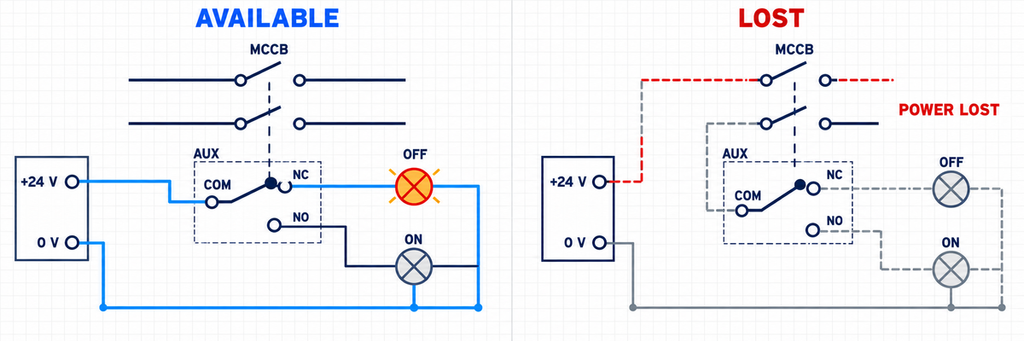
Comparison of an available independent control supply and a lost outgoing-side supply for MCCB ON and OFF indication lamps.Two lamps can show both states only when the available contact arrangement and circuit separation permit it. A single changeover contact can direct one common feed to one of two outputs, but that does not automatically make it suitable for two unrelated supplies. Never place different control voltages on NO and NC when they share COM unless the accessory documentation and circuit design explicitly permit the arrangement.
Interposing relays
An interposing relay can separate the MCCB accessory from several downstream contacts or from a load whose switching duty is unsuitable for the accessory. It does not remove the need to check the auxiliary contact. The contact must still make and break the relay coil under the specified conditions, and the relay coil must match its supply.
For a DC coil, any suppression component affects release time and voltage polarity and should follow the relay or interface manufacturer’s guidance. Avoid adding a generic diode or suppressor merely because one appeared in another diagram.
Example 2: a 24 V DC PLC digital input
A PLC digital input measures an electrical condition relative to its input common. The auxiliary contact simply changes the path. Whether the field contact switches the positive conductor, the return conductor or another defined input reference depends on the input module’s sourcing/sinking arrangement and the project convention.
Assumptions for this example: the PLC input turns ON when supplied with +24 V relative to its 0 V common; the selected position contact closes COM–NO with the breaker ON and opens it in OFF and TRIP. These are example conditions to verify against the two product diagrams, not universal terminal assignments.
- Connect the protected +24 V control supply to the auxiliary contact COM.
- Connect the example’s NO output to a PLC digital input, here named DI0.
- Connect that input group’s common to the control supply 0 V, as specified by the module.
- Assign DI0 a literal meaning such as
MCCB_CLOSED_FB, and verify it against the installed breaker position.
The closed loop is +24 V → COM → NO → DI0 → input circuitry → input common → 0 V.
Alternative: switching the input to 0 V. For a module designed to turn ON when its input is connected to 0 V, connect the input-group common to +24 V, the auxiliary contact COM to 0 V, and the selected contact output to DI0. When the contact closes, current flows from +24 V through the input circuitry and the contact to 0 V. The group common must follow the input module diagram; this is not a setting that can be changed independently for each point on a shared-common group.
| Connection | Switch +24 V to DI | Switch DI to 0 V |
|---|---|---|
| PLC input-group common | 0 V | +24 V |
| Auxiliary contact COM | Protected +24 V | 0 V |
| Selected contact output | DI0 | DI0 |
| Input module terminology by current direction | Sinking input; accepts a sourcing field signal | Sourcing input; accepts a sinking field signal |
| Corresponding transistor sensor output type | PNP sourcing output | NPN sinking output |
A mechanical dry contact is neither an NPN nor a PNP transistor. It can switch either path when its ratings and insulation suit the circuit. The sensor terms in the table explain current direction; the input module’s actual connection diagram takes priority over an ambiguous “NPN input” or “PNP input” label. Do not assume the arrangement from a PLC brand or country of origin.
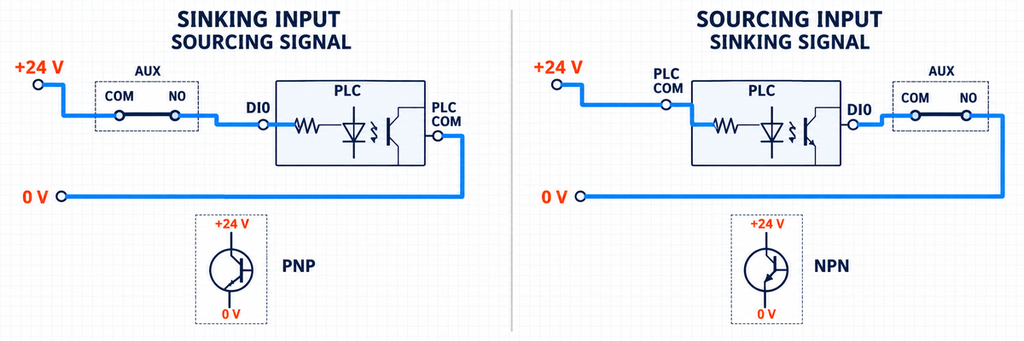
Two 24 volt PLC input arrangements showing a dry contact switching a sourcing or sinking field signal.| Condition | Example COM–NO path | DI0 | What the display can say |
|---|---|---|---|
| Breaker ON | Closed | ВКЛ | Closed-position feedback present |
| Breaker manually OFF | Open | ОТКЛ | Closed-position feedback absent |
| Breaker TRIP | Open | ОТКЛ | Closed-position feedback absent; a separate signal is needed to identify trip |
| Field wire broken while breaker remains ON | Contact closed, but circuit interrupted | ОТКЛ | Closed-position feedback absent; DI0 alone cannot identify the cause |
For an illustrative 24 V DC input, suppose the module documentation states that the input draws 4 mA in its ON state. The closed auxiliary path therefore carries approximately 4 mA, not the MCCB feeder current. That current must fall inside both the input module’s valid ON region and the auxiliary contact’s permitted low-level switching conditions. The numerical values in this example are assumptions, not JUTRION product ratings; use the selected input and accessory data for the real circuit.
Check Both the Maximum Rating and the Minimum Switching Load
Contact selection has an upper boundary and, for some products, a lower boundary.
The upper ratings describe the voltage, current and load conditions the contact can switch. A resistive lamp, an AC relay coil and a DC inductive load can impose different making and breaking stresses even when their steady currents look similar. The relevant operational category and the manufacturer’s AC/DC data matter more than a single headline ampere value.
The lower boundary matters when the contact is used with a low-current electronic input. Contact surface condition, film and available wetting energy can affect whether a very small sensing current is transferred consistently. Some manufacturers publish a minimum conductivity or low-level version for this reason. A contact rated for a comparatively large conventional thermal current is not automatically proven for every milliamperes-level input.
For low-current PLC inputs, look for a documented low-level switching specification. Gold-clad or gold-plated contacts and twin-contact designs can be useful selection clues, but neither a material name nor a contact shape proves suitability at your voltage and current. A twin or bifurcated contact provides multiple contact points; “double-break” describes a different feature and is not an equivalent microload specification. Confirm the accessory’s minimum applicable load and whether prior higher-load switching affects its subsequent low-level use.
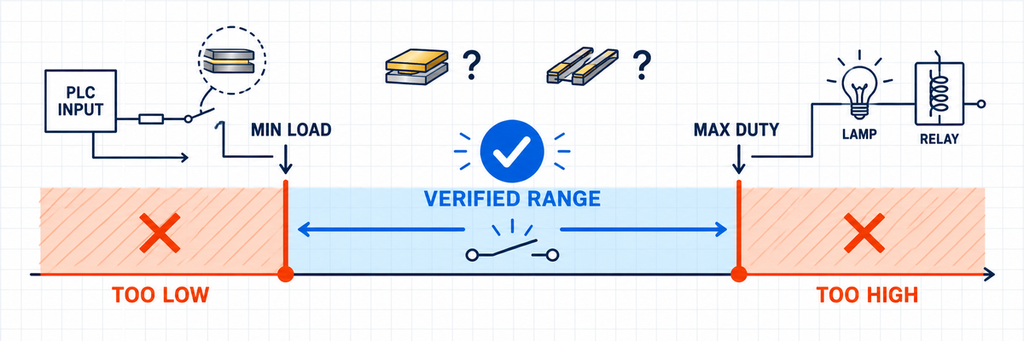
Two 24 volt PLC input arrangements showing a dry contact switching a sourcing or sinking field signal.In the illustrative 4 mA input circuit, a contact with a documented minimum current of 10 mA at the relevant voltage would not meet the stated application condition, even if its maximum rating were several amperes. These are hypothetical comparison values, not accessory specifications. Select a contact documented for the actual input duty, or a suitable interface whose input load meets the contact requirements; adding an arbitrary resistor is not a substitute for checking the circuit.
For each receiving circuit, confirm:
- rated operating voltage and whether the circuit is AC or DC;
- load current during making and breaking, not only during steady operation;
- load type or utilization category where specified;
- minimum applicable voltage/current or low-level-contact requirement;
- electrical separation between circuits sharing a common terminal;
- terminal conductor range, tightening requirement or supplied lead type.
IEC 60947-5-1 covers electromechanical control-circuit devices used for functions including signalling and interlocking. It provides the product-standard context, but the selected accessory’s declared characteristics still determine its usable circuit.
Can NO or NC Wiring Detect a Broken Wire?
NO versus NC is not a universal “safe versus unsafe” choice. It is a logic choice tied to the documented contact state, the required message and the failures the monitoring system must detect.
Consider a status input intended to be TRUE while the breaker is closed. If the chosen contact path is also closed in that state, a broken field wire or lost sensing supply will usually make the input FALSE. That is useful because a FALSE signal no longer confirms closure. However, it still does not distinguish among an open breaker, a broken wire, loss of control power and an input-module fault.
If that distinction matters, the system needs more information. Depending on the application, this may include:
- a second complementary contact path;
- a separate trip/alarm contact;
- monitoring of the control supply;
- line-supervision hardware designed for the circuit;
- plausibility logic comparing command, position and trip states.
Using both sides of a changeover contact can improve plausibility checking when the receiving inputs are designed for it. In a stable state, one path is expected closed and the other open. An impossible combination can flag a wiring, input or contact problem. This is diagnostic logic, not a substitute for a safety-rated position-monitoring architecture where one is required.
Separate contact debounce from a position-discrepancy alarm. A break-before-make contact can briefly leave both inputs OFF while transferring, and contact bounce can produce several rapid changes. The input filter suppresses short pulses; the discrepancy timer decides how long an unexpected combination may persist before an alarm. Those settings serve different purposes.
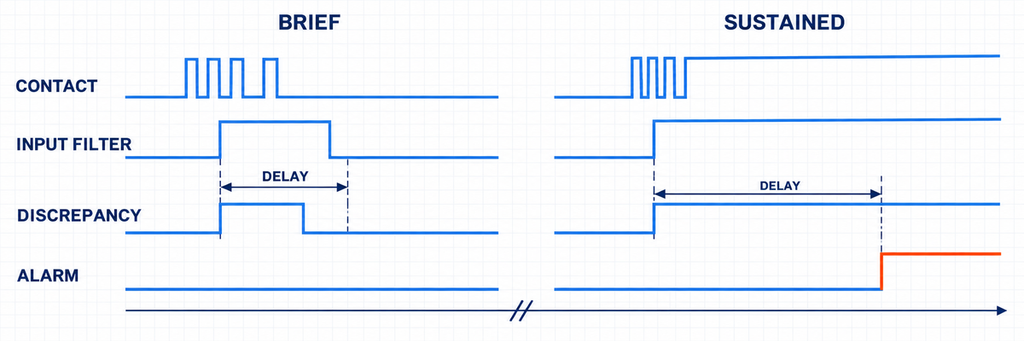
Timing diagram distinguishing contact input filtering from a sustained position-discrepancy alarm delay.Start with the accessory’s documented behavior and the PLC’s available input filters. Account for input filtering, program scan time and any software delay when checking the required response time. Verify OFF, ON and permitted TRIP transitions, then verify that a sustained missing or inconsistent signal is still detected. There is no universal 10–30 ms setting for all MCCB accessories; excessive filtering can hide a short event or delay its indication.
Safety reminder: an OPEN indication is not proof that the circuit is dead. A position contact reports mechanism state, not a voltage measurement. Qualified personnel must verify absence of voltage using the applicable safe-isolation procedure and suitable test equipment. A panel lamp or PLC status bit cannot replace that check.
Replacing an MCCB Auxiliary Contact: What Must Match?
An electrically suitable auxiliary contact will not work if its actuator does not engage the breaker mechanism. Replacement matching should therefore begin with the breaker, not with a familiar contact code.
Check these interfaces together:
- Breaker family and frame: two MCCBs with the same rated current can use different internal cavities and mechanisms.
- Функция аксессуара: position feedback, general trip indication and protection-specific indication are different mechanisms.
- Mounting side and slot: the permitted location can change with the breaker and other installed accessories.
- Actuator position and travel: the contact must be operated through the full intended breaker sequence after the cover is fitted.
- Contact arrangement: 1NO+1NC may describe one changeover function or separate paths; read the actual diagram.
- Connection form: flying leads, screw terminals and plug connectors require different routing, clearances and strain control.
- Electrical duty: match the real lamp, relay or input circuit rather than the feeder rating.
Photographs of the housing alone are not enough for a confident replacement. The useful evidence is the complete breaker nameplate, original accessory reference, mounting location, existing lead or terminal arrangement and the signal the control system expects. The broader руководство по аксессуарам для автоматических выключателей explains why function, voltage, frame and installation position must be matched together.
For remote operation systems, also separate feedback from command. A position auxiliary contact reports a state; it does not open, reset or close an MCCB. Those functions belong to devices such as a motorized operating mechanism or, for opening only, the release selected in the shunt trip versus undervoltage release comparison.
Test OFF, ON and TRIP Before Handover
Testing only the loose accessory can confirm contact continuity, but it cannot confirm installed mechanism travel, terminal wiring, PLC configuration or the message shown to the operator. Commission the complete chain.
- Verify identity. Confirm the breaker, frame, accessory function, part reference and permitted mounting location.
- Isolate the equipment. Qualified personnel should isolate the main circuit and every separate control supply, verify absence of voltage, and follow the breaker’s stored-energy instructions before accessing an internal accessory.
- Check continuity. Disconnect the contact from external circuits before resistance testing. Identify the reference state from the diagram and verify the expected COM–NO and COM–NC paths without forcing an actuator outside its permitted travel.
- Install and inspect. Confirm full seating, actuator engagement, conductor routing and that the breaker cover closes without forcing the accessory or leads.
- Operate every required state. Check the reset-open, closed and tripped conditions included in the application. Use the manufacturer’s permitted test method.
- Observe the receiving device. After restoring covers and the required control power under the commissioning procedure, confirm the actual lamp, relay, PLC or BMS input changes as intended. Keep resistance/continuity testing separate from energized functional checks.
- Verify the displayed meaning. Make sure the HMI label and alarm logic describe what the contact really proves.
- Test relevant loss conditions. Where the design requires it, verify the response to loss of sensing power or an opened field connection using an approved test method.
IEC 60947-2 places circuit-breakers within a product scope intended for instructed or skilled persons. Installation rules, isolation procedures and permitted functional tests still come from the applicable local requirements and the actual breaker documentation.
Troubleshooting Reversed, Missing or Intermittent Signals
Start at the displayed symptom and work back through the receiving device, field circuit, contact and mechanical interface. Do not replace the accessory simply because the PLC bit looks wrong.
| Наблюдаемый симптом | Plausible cause | Useful verification | Решение |
|---|---|---|---|
| ON and OFF indications are reversed | NO/NC path interpreted from the wrong reference state, or HMI logic inverted | Compare continuity and input state with the documented breaker positions | Correct the selected path or software meaning; do not relabel an unverified signal |
| Loose accessory changes state, installed accessory does not | Wrong mounting variant, incomplete seating or insufficient actuator engagement | Inspect the permitted slot and installed travel with power isolated | Correct the mechanical match; rewiring will not fix missing engagement |
| Meter continuity changes, PLC input does not | Wrong input common/polarity, missing sensing supply, threshold mismatch or open field wiring | Check the input module diagram and measure the permitted field voltage at the input | Correct the interface circuit before condemning the contact |
| PLC input works intermittently at very low current | Input current below the contact’s specified low-level condition, contamination or loose termination | Compare actual input current with minimum contact data and inspect the termination | Use a suitable low-level contact or approved interface and correct the connection |
| Position signal shows open but operator expects a trip alarm | Position contact is being used to infer the cause of opening | Compare manual OFF and permitted trip-test responses | Add the correct alarm/trip indication instead of changing NO to NC |
| Both complementary PLC inputs remain in the same state after movement has settled | Shared-common error, crossed conductors, input-reference problem or contact/mechanism fault | Isolate sections of the chain and compare each input with direct continuity results | Repair the proven fault and repeat the full state sequence |
A diagnostic table narrows the search; it does not establish a unique cause without measurements. After any correction, repeat the entire state sequence rather than checking only the symptom that first appeared.
Choosing a Contact for Your Breaker and Control Circuit
A useful auxiliary-contact request contains two kinds of information: what the control system must know and which breaker must operate the contact. State the required indication, receiving circuit voltage and load type, contact arrangement, breaker model/frame, mounting location and connection form.
JUTRION supplies auxiliary contacts and related MCB/MCCB accessories for JUTRION breaker combinations and compatible replacement applications across multiple breaker platforms. For matching support, send the breaker nameplate, original accessory reference, mounting-area photographs and the required signal. The result should be checked as a complete mechanical and electrical interface, not selected from NO/NC markings alone.
Технические ссылки
- IEC 60947-2:2024 — Низковольтное оборудование и аппаратура управления — Часть 2: Автоматы
- IEC 60947-5-1:2024 — Устройства управления цепями и элементы переключения — Электромеханические устройства управления цепями
- AutomationDirect — Matching NPN and PNP sensor outputs to sourcing and sinking PLC inputs
- OMRON — General Purpose Relays: minute-load contact reliability and twin contacts. General contact-selection background, not a rating or compatibility declaration for a JUTRION accessory.
- LOVATO Electric — P5X1011UL trip-indication contact: an example of published contact ratings and minimum conductivity. This source illustrates electrical specification fields; it does not define the position-contact behavior assumed in the wiring examples.
