

การเดินสายสำหรับคอนแทคเสริม MCCB: NO, NC, COM และการเชื่อมต่อ PLC
เพื่อเดินสาย MCCB auxiliary contact ให้เชื่อมต่อแหล่งจ่ายควบคุมภายนอกผ่านเส้นทางการติดต่อที่ปิดในสถานะเบรกเกอร์ที่คุณต้องการแสดง จากนั้นไปยังหลอดไฟหรืออินพุต PLC ที่เข้ากันได้ สำหรับอินพุต 24 V DC ที่มีการสลับบวกทั่วไป เส้นทางคือ +24 V → สัมผัสเสริม COM → เอาต์พุตที่เลือก → อินพุต PLC, โดยที่กลุ่มอินพุตทั่วไปเชื่อมต่อกับ 0 V ระบุขั้วต่อจริงจากแผนภาพอุปกรณ์เสริมก่อนทำการเชื่อมต่อ.
การเดินสาย MCCB auxiliary contact จะนำกระแสในวงจรตรวจสอบ ไม่ใช่กระแสโหลดของเบรกเกอร์ ติดต่อทำหน้าที่เป็นสวิตช์; มันไม่สร้างแรงดันไฟฟ้า ตัวอย่างด้านล่างแสดงวิธีการเปลี่ยนการกระทำการสลับนั้นให้เป็นการแสดงผล ON/OFF ที่มีประโยชน์และวิธีการตรวจสอบผลลัพธ์เมื่อเปลี่ยนอุปกรณ์เสริม.
อุปกรณ์เสริมควรแสดงอะไร?
เริ่มต้นด้วยข้อความที่แผงต้องแสดง “เบรกเกอร์ปิด,” “เบรกเกอร์เปิด” และ “เบรกเกอร์ตัด” ไม่ใช่สัญญาณที่สามารถใช้แทนกันได้.
อุปกรณ์เสริมที่แสดงตำแหน่งมักจะตามตำแหน่งการทำงานที่บันทึกของเบรกเกอร์ มันสามารถให้การแสดงผล ON หรือ OFF ระยะไกล ขึ้นอยู่กับว่าใช้เส้นทางการติดต่อใด มันไม่สามารถพิสูจน์ได้ด้วยตัวเองว่าทำไมเบรกเกอร์ถึงเปิด หากระบบตรวจสอบต้องแยกการตัดการป้องกันออกจากการปิดโดยเจตนา มันยังต้องการการแสดงผลการตัดที่เหมาะสม ขอบเขตการทำงานอธิบายไว้ใน MCCB auxiliary contact กับ alarm contact.
เขียนข้อความที่ต้องการเป็นข้อความจริงก่อนที่จะวาดวงจร ตัวอย่างเช่น:
- “หลอดไฟเบรกเกอร์ปิด” เปิด: MCCB อยู่ในตำแหน่งปิดที่บันทึกไว้; เลือกสีหลอดไฟให้เหมาะกับข้อตกลงของแผง.
- อินพุต PLC TRUE: เส้นทางสัญญาณตำแหน่งปิดของ MCCB เสร็จสมบูรณ์.
- หลอดไฟสีแดงเปิด: อุปกรณ์เสริมสัญญาณเตือนแสดงเหตุการณ์การตัดที่เกิดขึ้น.
ข้อความนี้ป้องกันข้อผิดพลาดในการออกแบบทั่วไป: การติดป้ายทุกสัญญาณตำแหน่งเปิดว่า “TRIP” เบรกเกอร์อาจเปิดเพราะผู้ปฏิบัติงานปิดมัน, ตัวดำเนินการมอเตอร์เปิดมัน, หรือกลไกการตัดทำงาน ข้อมูลย้อนกลับตำแหน่งเพียงอย่างเดียวไม่สามารถแยกสาเหตุเหล่านั้นได้.
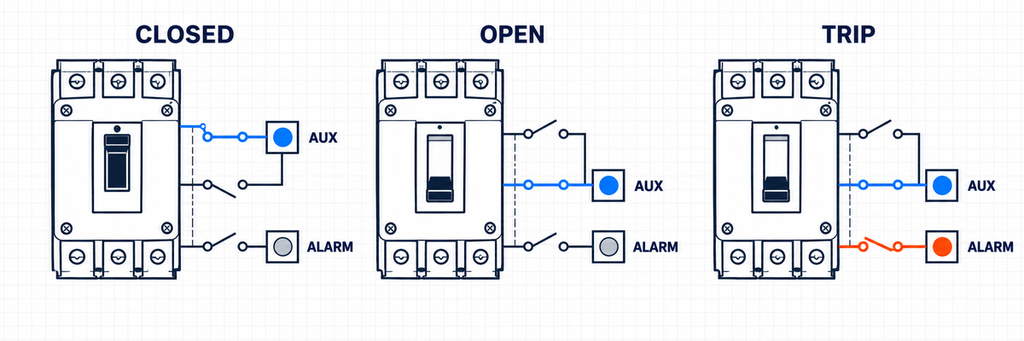
MCCB ปิด เปิด และสถานะตัดแสดงข้อมูลย้อนกลับตำแหน่งแยกจากการแสดงผลการตัด.COM, NO และ NC หมายถึงอะไร?
อุปกรณ์ติดต่อเปลี่ยนมีขั้วทั่วไปที่เคลื่อนที่หนึ่งขั้วและสองเส้นทางทางเลือก:
- COM (ทั่วไป): ด้านที่เคลื่อนที่ซึ่งแชร์โดยสองเส้นทาง.
- NC (ปิดตามปกติ): เชื่อมต่อกับ COM ในสภาพปกติหรืออ้างอิงที่ระบุ.
- NO (เปิดตามปกติ): ไม่เชื่อมต่อกับ COM ในสภาพเดียวกันและเชื่อมต่อหลังจากกลไกเปลี่ยนสถานะ.
คำว่า ตามปกติ มีประโยชน์เฉพาะเมื่อสภาพอ้างอิงเป็นที่รู้จัก ขึ้นอยู่กับอุปกรณ์เสริมและเอกสารของมัน แผนภาพอาจแสดงให้เห็นว่าเบรกเกอร์เปิด, รีเซ็ต, ปิด, ตัด, ถอดออกหรือปล่อยตัวกระตุ้น อย่าใช้สมมติฐานว่า NC หมายถึง “เบรกเกอร์ปิด” เสมอ หรือว่า NO จะปิดเมื่อ MCCB เปิด.
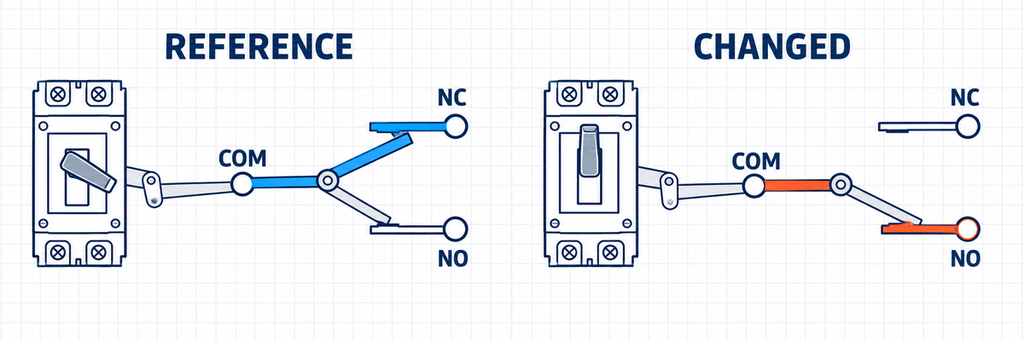
อุปกรณ์ติดต่อเปลี่ยนแสดง COM เชื่อมต่อกับ NC ในสภาพอ้างอิงและกับ NO หลังจากกลไกเปลี่ยน.เช่นเดียวกัน อย่าโอนหมายเลขเทอร์มินัลจากแบรนด์หรือครอบครัวเบรกเกอร์อื่น หมายเลขเช่น 11–12–14 อาจคุ้นเคยในอุปกรณ์ควบคุม แต่ของเสริม MCCB อาจใช้แผนการที่แตกต่างกัน สายไฟที่หลุดลอย หรือบล็อกเทอร์มินัลเฉพาะรุ่น สีของสายไฟก็ไม่ใช่วิธีการระบุที่เป็นสากลเช่นกัน.
ลำดับที่เชื่อถือได้คือ:
- ระบุครอบครัวเบรกเกอร์ที่แน่นอน ขนาดเฟรม และหมายเลขอ้างอิงของอุปกรณ์เสริม.
- ค้นหารูปแบบการติดต่อและสภาพกลไกที่ระบุ.
- ระบุ COM, NO และ NC จากแผนภาพนั้น.
- เมื่ออุปกรณ์ถูกแยกออก ยืนยันการเปลี่ยนแปลงความต่อเนื่องที่คาดหวังก่อนเชื่อมต่อวงจรที่รับ.
การทดสอบความต่อเนื่องสามารถยืนยันว่าสายไฟใดเปลี่ยนแปลงร่วมกัน แต่ไม่สามารถพิสูจน์ได้ว่าอุปกรณ์เสริมที่ไม่ตรงกันจะทำงานได้อย่างถูกต้องหลังการติดตั้ง การมีส่วนร่วมทางกลยังต้องได้รับการตรวจสอบ.
ข้อควรระวังในการเดินสาย: ติดต่อ COM ไม่ใช่ PLC input common. ติดต่อ COM เป็นขั้วทั่วไปของสวิตช์กลไก PLC input common เป็นการอ้างอิงทางไฟฟ้าสำหรับกลุ่มอินพุต ในตัวอย่างที่สวิตช์บวกด้านล่าง ติดต่อ COM เชื่อมต่อกับ +24 V และ PLC input common เชื่อมต่อกับ 0 V: การเชื่อมต่อโดยตรงจะทำให้แหล่งจ่ายควบคุมลัดวงจร ระบุฟังก์ชันของพวกเขาจากวงจร ไม่ใช่จากคำว่า “common” ที่ใช้ร่วมกัน”
จับคู่การติดต่อกับวงจรที่รับ
การติดต่อเปลี่ยนแปลงเดียวกันอาจสามารถจ่ายไฟให้กับหลอดไฟ รีเลย์กลาง หรือ PLC input แต่โหลดเหล่านั้นไม่ทำงานเหมือนกัน อุปกรณ์ที่รับจะกำหนดแรงดันไฟฟ้า กระแส ความเป็นขั้ว และการเชื่อมต่อทั่วไป.
| วงจรที่รับ | สิ่งที่การติดต่อเสริมทำ | สิ่งที่ต้องตรวจสอบ | ข้อผิดพลาดในการออกแบบทั่วไป |
|---|---|---|---|
| หลอดไฟแสดงสถานะ | ทำให้เส้นทางจ่ายไฟหลอดไฟเสร็จสมบูรณ์หรือเปิด | แรงดันไฟฟ้าหลอดไฟ กระแสคงที่ กระแสเริ่มต้นเมื่อจำเป็น หน้าที่การติดต่อ และข้อความ ON/OFF ที่ต้องการ | สมมติว่าการติดต่อจ่ายไฟให้กับหลอดไฟ |
| รีเลย์กลาง | สลับวงจรขดลวดรีเลย์ | แรงดันขดลวด, ประเภท AC/DC, กระแสที่ดึงดูดและการจัดเรียงการป้องกัน | ตรวจสอบเฉพาะกระแสที่ถือของรีเลย์และไม่สนใจภาระการสลับ |
| อินพุตดิจิตอล PLC หรือ BMS | นำแหล่งจ่ายการตรวจจับภายนอกไปยังหรือจากอินพุต | ประเภทอินพุต, เกณฑ์ ON/OFF, กระแสอินพุต, ขั้ว, คอมมอน/อ้างอิงและภาระการติดต่อขั้นต่ำ | คัดลอกแผนภาพ 24 V ทั่วไปโดยไม่ตรวจสอบโมดูลอินพุต |
ตัวอย่างที่ 1: ตัวบ่งชี้ที่ปิดเบรกเกอร์ 24 V DC
สำหรับหลอดไฟที่ปิดอยู่แบบง่าย, เส้นทางเสริมที่เลือกจะถูกวางในอนุกรมกับหลอดไฟที่มีการจัดอันดับอย่างถูกต้องและแหล่งจ่ายภายนอกของมัน วงจรควรถูกออกแบบจากการบ่งชี้ที่ต้องการ: หากหลอดไฟต้องสว่างเมื่อเบรกเกอร์ปิด, ให้เลือกเส้นทางที่ปิดในสถานะเบรกเกอร์ที่บันทึกไว้.
การเชื่อมต่อที่แสดง: แหล่งจ่าย +24 V DC ที่ป้องกัน → ติดต่อ COM → ติดต่อเอาต์พุตที่ปิดด้วย MCCB → ขั้วบวกของหลอดไฟ 24 V DC เชื่อมต่อขั้วลบของหลอดไฟกับแหล่งจ่าย 0 V ใช้การประกอบหลอดไฟที่มีการจัดอันดับสำหรับการเชื่อมต่อโดยตรงกับ 24 V DC, ไม่ใช่ LED เปลือยที่ไม่มีการป้องกัน.
สมมติว่าแผนภาพของอุปกรณ์เสริมนี้ระบุเส้นทาง NO ว่าเป็นปิดเมื่อเบรกเกอร์ที่ติดตั้งอยู่ในสถานะ ON COM–NO จะจ่ายไฟให้กับหลอดไฟ “เบรกเกอร์ปิด” เมื่อเบรกเกอร์เปิด, เส้นทางนั้นจะเปิดและหลอดไฟจะดับ หากต้องการหลอดไฟที่เปิดอยู่ด้วย, COM–NC สามารถจ่ายไฟให้กับหลอดไฟที่มีการจัดอันดับอย่างถูกต้องจากแหล่งจ่ายเดียวกัน, ตราบใดที่การทำงานของการติดต่อที่บันทึกไว้สนับสนุนมัน ระบุหลอดไฟตามตำแหน่ง; หลอดไฟที่เปิดอยู่ไม่ระบุการตัด.
เลือกตำแหน่งแหล่งจ่ายอย่างรอบคอบ หากแหล่งจ่ายควบคุมถูกนำมาจากด้านออกของ MCCB, การเปิดเบรกเกอร์อาจทำให้ไฟฟ้าหายไปจากหลอดไฟทั้งสอง เพื่อแสดงสถานะเปิดหลังจากการตัดการเชื่อมต่อ, วงจรการบ่งชี้ต้องการแหล่งจ่ายที่เหมาะสมซึ่งยังคงมีอยู่ แหล่งที่มาที่แยกต่างหากนั้นต้องรวมอยู่ในขั้นตอนการแยกของแผง.
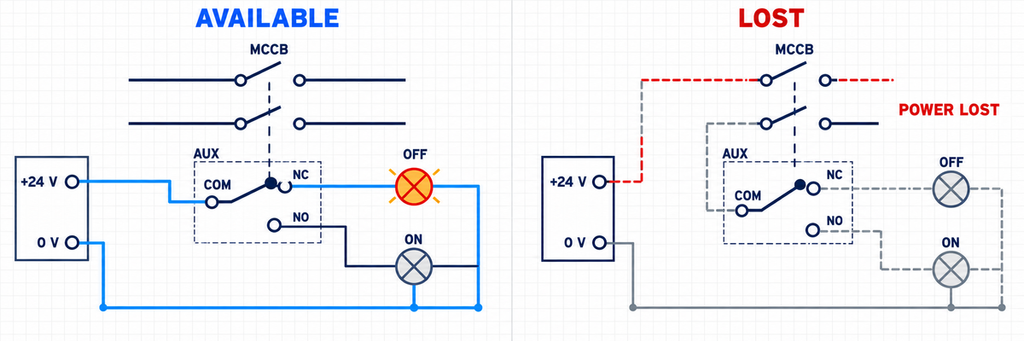
การเปรียบเทียบแหล่งจ่ายควบคุมอิสระที่มีอยู่และแหล่งจ่ายด้านออกที่หายไปสำหรับหลอดไฟบ่งชี้ MCCB ON และ OFF.หลอดไฟสองดวงสามารถแสดงสถานะทั้งสองได้เฉพาะเมื่อการจัดเรียงการติดต่อที่มีอยู่และการแยกวงจรอนุญาตให้ทำได้ ติดต่อเปลี่ยนแปลงเดียวสามารถนำการจ่ายทั่วไปไปยังเอาต์พุตหนึ่งในสองได้, แต่ไม่ได้หมายความว่าเหมาะสมสำหรับแหล่งจ่ายที่ไม่เกี่ยวข้องสองแหล่ง อย่าวางแรงดันควบคุมที่แตกต่างกันบน NO และ NC เมื่อพวกเขาแชร์ COM เว้นแต่เอกสารอุปกรณ์เสริมและการออกแบบวงจรจะอนุญาตการจัดเรียงนั้นอย่างชัดเจน.
รีเลย์กลาง
รีเลย์กลางสามารถแยกอุปกรณ์เสริม MCCB ออกจากหลายติดต่อที่อยู่ด้านล่างหรือจากภาระที่มีภาระการสลับที่ไม่เหมาะสมสำหรับอุปกรณ์เสริม มันไม่ได้ลบความจำเป็นในการตรวจสอบการติดต่อเสริม การติดต่อยังคงต้องทำและตัดขดลวดรีเลย์ภายใต้เงื่อนไขที่กำหนด, และขดลวดรีเลย์ต้องตรงกับแหล่งจ่ายของมัน.
สำหรับขดลวด DC องค์ประกอบการป้องกันใด ๆ จะมีผลต่อเวลาในการปล่อยและขั้วไฟฟ้า และควรปฏิบัติตามคำแนะนำของผู้ผลิตรีเลย์หรืออินเตอร์เฟซ หลีกเลี่ยงการเพิ่มไดโอดทั่วไปหรืออุปกรณ์ป้องกันเพียงเพราะมีอยู่ในแผนภาพอื่น.
ตัวอย่างที่ 2: ข้อมูลดิจิตอล PLC 24 V DC
ข้อมูลดิจิตอล PLC วัดสภาพไฟฟ้าเมื่อเปรียบเทียบกับคอมมอนของข้อมูลเข้า ข้อมูลติดต่อเสริมเพียงแค่เปลี่ยนเส้นทาง ไม่ว่าจะเป็นการสลับตัวนำบวก ตัวนำกลับ หรือการอ้างอิงข้อมูลเข้าอื่น ๆ ขึ้นอยู่กับการจัดเรียงการจ่าย/ดูดของโมดูลข้อมูลเข้าและข้อตกลงของโครงการ.
สมมติฐานสำหรับตัวอย่างนี้: ข้อมูลเข้า PLC จะเปิดเมื่อมีการจ่าย +24 V เมื่อเปรียบเทียบกับคอมมอน 0 V ของมัน; สถานะที่เลือกจะปิด COM–NO เมื่อเบรกเกอร์เปิดและเปิดเมื่อปิดและ TRIP นี่เป็นเงื่อนไขตัวอย่างเพื่อยืนยันกับแผนภาพผลิตภัณฑ์ทั้งสอง ไม่ใช่การกำหนดขั้วทั่วไป.
- เชื่อมต่อแหล่งจ่ายควบคุม +24 V ที่ได้รับการป้องกันกับ COM ของข้อมูลติดต่อเสริม.
- เชื่อมต่อเอาต์พุต NO ของตัวอย่างกับข้อมูลดิจิตอล PLC ที่นี่ชื่อว่า DI0.
- เชื่อมต่อคอมมอนของกลุ่มข้อมูลนั้นกับแหล่งจ่ายควบคุม 0 V ตามที่ระบุโดยโมดูล.
- กำหนด DI0 ให้มีความหมายตามตัวอักษร เช่น
MCCB_CLOSED_FB, และตรวจสอบกับตำแหน่งเบรกเกอร์ที่ติดตั้ง.
วงจรปิดคือ +24 V → COM → NO → DI0 → วงจรข้อมูลเข้า → คอมมอนข้อมูลเข้า → 0 V.
ทางเลือก: สลับข้อมูลเข้าไปที่ 0 V. สำหรับโมดูลที่ออกแบบมาให้เปิดเมื่อข้อมูลเชื่อมต่อกับ 0 V ให้เชื่อมต่อคอมมอนของกลุ่มข้อมูลกับ +24 V, COM ของข้อมูลติดต่อเสริมกับ 0 V, และเอาต์พุตของข้อมูลติดต่อที่เลือกกับ DI0 เมื่อข้อมูลติดต่อปิด กระแสไฟจะไหลจาก +24 V ผ่านวงจรข้อมูลเข้าและข้อมูลติดต่อไปยัง 0 V คอมมอนของกลุ่มต้องปฏิบัติตามแผนภาพโมดูลข้อมูลเข้า; นี่ไม่ใช่การตั้งค่าที่สามารถเปลี่ยนแปลงได้อย่างอิสระสำหรับแต่ละจุดในกลุ่มคอมมอนที่แชร์.
| การเชื่อมต่อ | สลับ +24 V ไปยัง DI | สลับ DI ไปยัง 0 V |
|---|---|---|
| คอมมอนกลุ่มข้อมูล PLC | 0 โวลต์ | +24 โวลต์ |
| COM ของข้อมูลติดต่อเสริม | +24 V ที่ได้รับการป้องกัน | 0 โวลต์ |
| เอาต์พุตของข้อมูลติดต่อที่เลือก | DI0 | DI0 |
| เทอร์มินอลโมดูลข้อมูลตามทิศทางกระแส | ข้อมูลเข้าแบบดูด; รับสัญญาณจากสนามที่จ่าย | ข้อมูลเข้าแบบจ่าย; รับสัญญาณจากสนามที่ดูด |
| ประเภทเอาต์พุตเซ็นเซอร์ทรานซิสเตอร์ที่สอดคล้องกัน | เอาต์พุต PNP ที่จ่าย | เอาต์พุต NPN ที่ดูด |
ข้อมูลติดต่อแห้งทางกลไม่ใช่ทรานซิสเตอร์ NPN หรือ PNP มันสามารถสลับเส้นทางใดก็ได้เมื่อมีการจัดอันดับและการฉนวนที่เหมาะสมกับวงจร คำศัพท์เซ็นเซอร์ในตารางอธิบายทิศทางกระแส; แผนภาพการเชื่อมต่อจริงของโมดูลข้อมูลเข้าเป็นสิ่งสำคัญเหนือกว่า “ข้อมูลเข้า NPN” หรือ “ข้อมูลเข้า PNP” ที่ไม่ชัดเจน อย่าสมมติการจัดเรียงจากแบรนด์ PLC หรือประเทศต้นกำเนิด.
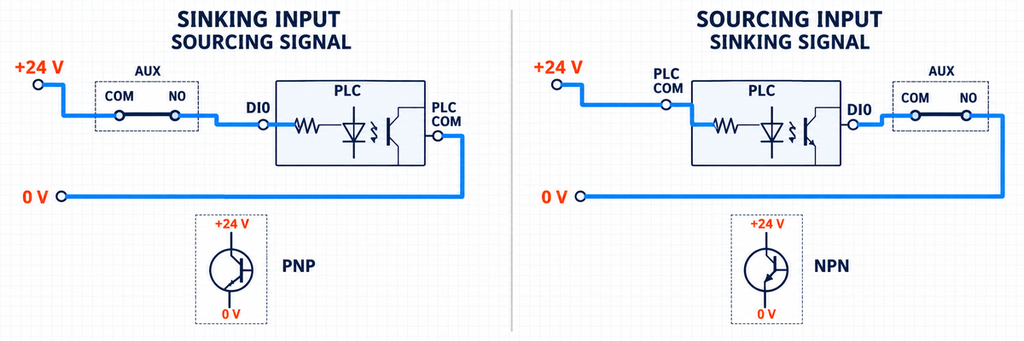
Two 24 volt PLC input arrangements showing a dry contact switching a sourcing or sinking field signal.| Condition | Example COM–NO path | DI0 | What the display can say |
|---|---|---|---|
| Breaker ON | Closed | เปิด | Closed-position feedback present |
| Breaker manually OFF | Open | ปิด | Closed-position feedback absent |
| Breaker TRIP | Open | ปิด | Closed-position feedback absent; a separate signal is needed to identify trip |
| Field wire broken while breaker remains ON | Contact closed, but circuit interrupted | ปิด | Closed-position feedback absent; DI0 alone cannot identify the cause |
For an illustrative 24 V DC input, suppose the module documentation states that the input draws 4 mA in its ON state. The closed auxiliary path therefore carries approximately 4 mA, not the MCCB feeder current. That current must fall inside both the input module’s valid ON region and the auxiliary contact’s permitted low-level switching conditions. The numerical values in this example are assumptions, not JUTRION product ratings; use the selected input and accessory data for the real circuit.
Check Both the Maximum Rating and the Minimum Switching Load
Contact selection has an upper boundary and, for some products, a lower boundary.
The upper ratings describe the voltage, current and load conditions the contact can switch. A resistive lamp, an AC relay coil and a DC inductive load can impose different making and breaking stresses even when their steady currents look similar. The relevant operational category and the manufacturer’s AC/DC data matter more than a single headline ampere value.
The lower boundary matters when the contact is used with a low-current electronic input. Contact surface condition, film and available wetting energy can affect whether a very small sensing current is transferred consistently. Some manufacturers publish a minimum conductivity or low-level version for this reason. A contact rated for a comparatively large conventional thermal current is not automatically proven for every milliamperes-level input.
For low-current PLC inputs, look for a documented low-level switching specification. Gold-clad or gold-plated contacts and twin-contact designs can be useful selection clues, but neither a material name nor a contact shape proves suitability at your voltage and current. A twin or bifurcated contact provides multiple contact points; “double-break” describes a different feature and is not an equivalent microload specification. Confirm the accessory’s minimum applicable load and whether prior higher-load switching affects its subsequent low-level use.
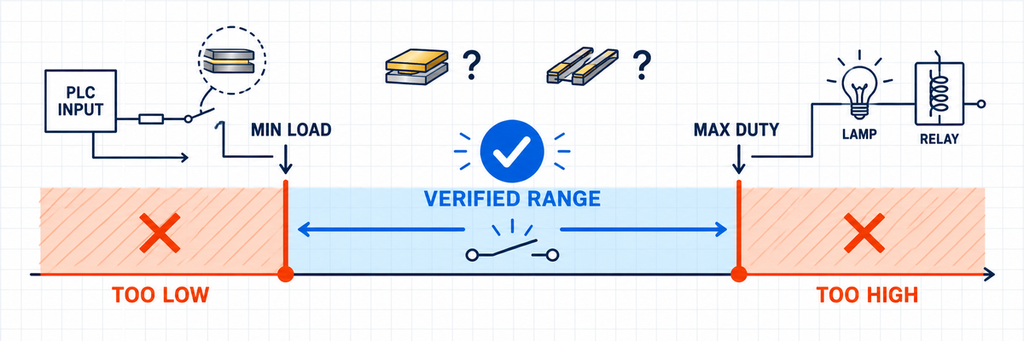
Two 24 volt PLC input arrangements showing a dry contact switching a sourcing or sinking field signal.In the illustrative 4 mA input circuit, a contact with a documented minimum current of 10 mA at the relevant voltage would not meet the stated application condition, even if its maximum rating were several amperes. These are hypothetical comparison values, not accessory specifications. Select a contact documented for the actual input duty, or a suitable interface whose input load meets the contact requirements; adding an arbitrary resistor is not a substitute for checking the circuit.
For each receiving circuit, confirm:
- rated operating voltage and whether the circuit is AC or DC;
- load current during making and breaking, not only during steady operation;
- load type or utilization category where specified;
- minimum applicable voltage/current or low-level-contact requirement;
- electrical separation between circuits sharing a common terminal;
- terminal conductor range, tightening requirement or supplied lead type.
IEC 60947-5-1 covers electromechanical control-circuit devices used for functions including signalling and interlocking. It provides the product-standard context, but the selected accessory’s declared characteristics still determine its usable circuit.
Can NO or NC Wiring Detect a Broken Wire?
NO versus NC is not a universal “safe versus unsafe” choice. It is a logic choice tied to the documented contact state, the required message and the failures the monitoring system must detect.
Consider a status input intended to be TRUE while the breaker is closed. If the chosen contact path is also closed in that state, a broken field wire or lost sensing supply will usually make the input FALSE. That is useful because a FALSE signal no longer confirms closure. However, it still does not distinguish among an open breaker, a broken wire, loss of control power and an input-module fault.
If that distinction matters, the system needs more information. Depending on the application, this may include:
- a second complementary contact path;
- a separate trip/alarm contact;
- monitoring of the control supply;
- line-supervision hardware designed for the circuit;
- plausibility logic comparing command, position and trip states.
Using both sides of a changeover contact can improve plausibility checking when the receiving inputs are designed for it. In a stable state, one path is expected closed and the other open. An impossible combination can flag a wiring, input or contact problem. This is diagnostic logic, not a substitute for a safety-rated position-monitoring architecture where one is required.
Separate contact debounce from a position-discrepancy alarm. A break-before-make contact can briefly leave both inputs OFF while transferring, and contact bounce can produce several rapid changes. The input filter suppresses short pulses; the discrepancy timer decides how long an unexpected combination may persist before an alarm. Those settings serve different purposes.
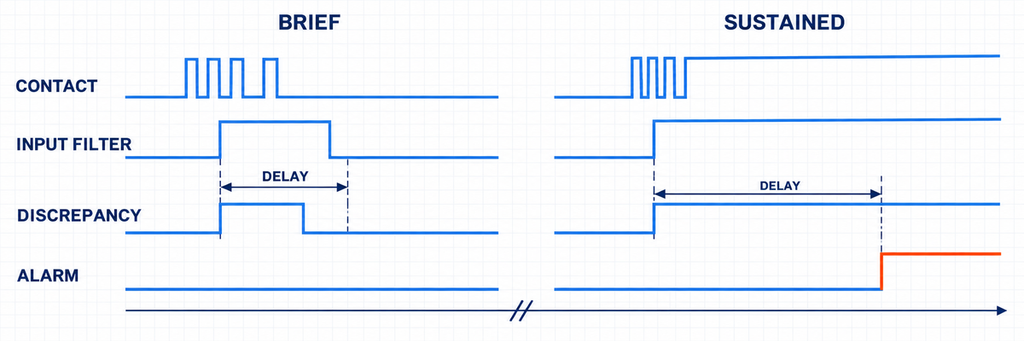
Timing diagram distinguishing contact input filtering from a sustained position-discrepancy alarm delay.Start with the accessory’s documented behavior and the PLC’s available input filters. Account for input filtering, program scan time and any software delay when checking the required response time. Verify OFF, ON and permitted TRIP transitions, then verify that a sustained missing or inconsistent signal is still detected. There is no universal 10–30 ms setting for all MCCB accessories; excessive filtering can hide a short event or delay its indication.
Safety reminder: an OPEN indication is not proof that the circuit is dead. A position contact reports mechanism state, not a voltage measurement. Qualified personnel must verify absence of voltage using the applicable safe-isolation procedure and suitable test equipment. A panel lamp or PLC status bit cannot replace that check.
Replacing an MCCB Auxiliary Contact: What Must Match?
An electrically suitable auxiliary contact will not work if its actuator does not engage the breaker mechanism. Replacement matching should therefore begin with the breaker, not with a familiar contact code.
Check these interfaces together:
- Breaker family and frame: two MCCBs with the same rated current can use different internal cavities and mechanisms.
- ฟังก์ชันอุปกรณ์เสริม: position feedback, general trip indication and protection-specific indication are different mechanisms.
- Mounting side and slot: the permitted location can change with the breaker and other installed accessories.
- Actuator position and travel: the contact must be operated through the full intended breaker sequence after the cover is fitted.
- Contact arrangement: 1NO+1NC may describe one changeover function or separate paths; read the actual diagram.
- Connection form: flying leads, screw terminals and plug connectors require different routing, clearances and strain control.
- Electrical duty: match the real lamp, relay or input circuit rather than the feeder rating.
Photographs of the housing alone are not enough for a confident replacement. The useful evidence is the complete breaker nameplate, original accessory reference, mounting location, existing lead or terminal arrangement and the signal the control system expects. The broader คู่มืออุปกรณ์เสริมเบรกเกอร์ explains why function, voltage, frame and installation position must be matched together.
For remote operation systems, also separate feedback from command. A position auxiliary contact reports a state; it does not open, reset or close an MCCB. Those functions belong to devices such as a motorized operating mechanism or, for opening only, the release selected in the shunt trip versus undervoltage release comparison.
Test OFF, ON and TRIP Before Handover
Testing only the loose accessory can confirm contact continuity, but it cannot confirm installed mechanism travel, terminal wiring, PLC configuration or the message shown to the operator. Commission the complete chain.
- Verify identity. Confirm the breaker, frame, accessory function, part reference and permitted mounting location.
- Isolate the equipment. Qualified personnel should isolate the main circuit and every separate control supply, verify absence of voltage, and follow the breaker’s stored-energy instructions before accessing an internal accessory.
- Check continuity. Disconnect the contact from external circuits before resistance testing. Identify the reference state from the diagram and verify the expected COM–NO and COM–NC paths without forcing an actuator outside its permitted travel.
- Install and inspect. Confirm full seating, actuator engagement, conductor routing and that the breaker cover closes without forcing the accessory or leads.
- Operate every required state. Check the reset-open, closed and tripped conditions included in the application. Use the manufacturer’s permitted test method.
- Observe the receiving device. After restoring covers and the required control power under the commissioning procedure, confirm the actual lamp, relay, PLC or BMS input changes as intended. Keep resistance/continuity testing separate from energized functional checks.
- Verify the displayed meaning. Make sure the HMI label and alarm logic describe what the contact really proves.
- Test relevant loss conditions. Where the design requires it, verify the response to loss of sensing power or an opened field connection using an approved test method.
IEC 60947-2 places circuit-breakers within a product scope intended for instructed or skilled persons. Installation rules, isolation procedures and permitted functional tests still come from the applicable local requirements and the actual breaker documentation.
Troubleshooting Reversed, Missing or Intermittent Signals
Start at the displayed symptom and work back through the receiving device, field circuit, contact and mechanical interface. Do not replace the accessory simply because the PLC bit looks wrong.
| อาการที่สังเกตได้ | Plausible cause | Useful verification | การตัดสินใจ |
|---|---|---|---|
| ON and OFF indications are reversed | NO/NC path interpreted from the wrong reference state, or HMI logic inverted | Compare continuity and input state with the documented breaker positions | Correct the selected path or software meaning; do not relabel an unverified signal |
| Loose accessory changes state, installed accessory does not | Wrong mounting variant, incomplete seating or insufficient actuator engagement | Inspect the permitted slot and installed travel with power isolated | Correct the mechanical match; rewiring will not fix missing engagement |
| Meter continuity changes, PLC input does not | Wrong input common/polarity, missing sensing supply, threshold mismatch or open field wiring | Check the input module diagram and measure the permitted field voltage at the input | Correct the interface circuit before condemning the contact |
| PLC input works intermittently at very low current | Input current below the contact’s specified low-level condition, contamination or loose termination | Compare actual input current with minimum contact data and inspect the termination | Use a suitable low-level contact or approved interface and correct the connection |
| Position signal shows open but operator expects a trip alarm | Position contact is being used to infer the cause of opening | Compare manual OFF and permitted trip-test responses | Add the correct alarm/trip indication instead of changing NO to NC |
| Both complementary PLC inputs remain in the same state after movement has settled | Shared-common error, crossed conductors, input-reference problem or contact/mechanism fault | Isolate sections of the chain and compare each input with direct continuity results | Repair the proven fault and repeat the full state sequence |
A diagnostic table narrows the search; it does not establish a unique cause without measurements. After any correction, repeat the entire state sequence rather than checking only the symptom that first appeared.
Choosing a Contact for Your Breaker and Control Circuit
A useful auxiliary-contact request contains two kinds of information: what the control system must know and which breaker must operate the contact. State the required indication, receiving circuit voltage and load type, contact arrangement, breaker model/frame, mounting location and connection form.
JUTRION supplies auxiliary contacts and related MCB/MCCB accessories for JUTRION breaker combinations and compatible replacement applications across multiple breaker platforms. For matching support, send the breaker nameplate, original accessory reference, mounting-area photographs and the required signal. The result should be checked as a complete mechanical and electrical interface, not selected from NO/NC markings alone.
เอกสารอ้างอิงทางเทคนิค
- IEC 60947-2:2024 — อุปกรณ์สวิตช์และอุปกรณ์ควบคุมแรงดันต่ำ — ส่วนที่ 2: เบรกเกอร์วงจร
- IEC 60947-5-1:2024 — อุปกรณ์วงจรควบคุมและองค์ประกอบการสลับ — อุปกรณ์วงจรควบคุมทางไฟฟ้า
- AutomationDirect — Matching NPN and PNP sensor outputs to sourcing and sinking PLC inputs
- OMRON — General Purpose Relays: minute-load contact reliability and twin contacts. General contact-selection background, not a rating or compatibility declaration for a JUTRION accessory.
- LOVATO Electric — P5X1011UL trip-indication contact: an example of published contact ratings and minimum conductivity. This source illustrates electrical specification fields; it does not define the position-contact behavior assumed in the wiring examples.
