

MCCB Auxiliary Contact vs Alarm Contact: Functions, Trip Indication and Selection
An MCCB auxiliary contact tells the control circuit whether the breaker is open or closed. An alarm contact tells it that a specified trip event has occurred. Choose auxiliary contacts for operating-status indication, alarm contacts for trip notification, and both when the panel needs the two pieces of information separately.
That difference is easy to miss when selecting a small accessory for a much larger breaker. Both products can have similar terminals and contact arrangements. Both may connect to indicator lamps, relays or a controller. What separates them is the action inside the breaker that operates the contact.
The right choice starts with what the user needs to know: “Is this breaker ON or OFF?” or “Has this breaker tripped?” Those are different requirements, even when both leave the main circuit open.
Auxiliary Contact vs Alarm Contact at a Glance
An auxiliary contact used for position indication follows the breaker’s operating mechanism. Its output changes as the breaker moves between the documented open and closed positions. An alarm contact responds to the designated trip-indication mechanism, so it supplies information about a trip rather than ordinary position alone.
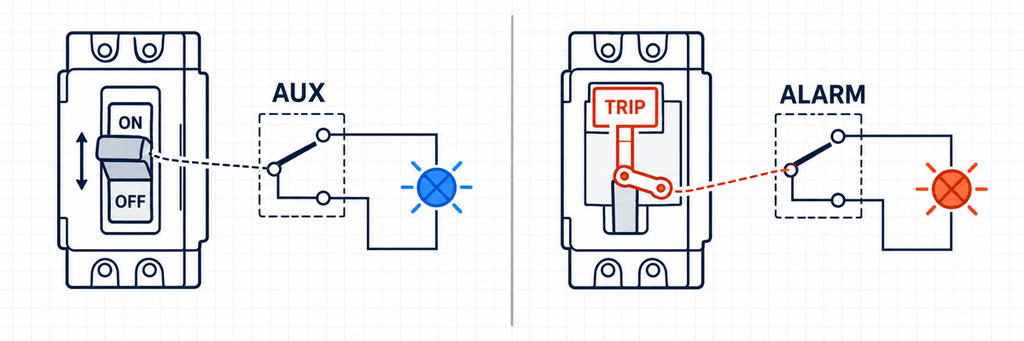
MCCB auxiliary contact reporting breaker position compared with an alarm contact reporting a trip event.| Comparison point | Position auxiliary contact | Alarm contact |
|---|---|---|
| Question answered | Is the breaker open or closed? | Has a covered trip event occurred? |
| Typical purpose | ON/OFF lamps, position monitoring and operating feedback | Trip lamps, notifications and trip-event reporting |
| During normal handle switching | Follows the change in position | Normally does not assert a trip alarm |
| When a covered trip opens the breaker | Reports the open position | Reports the trip |
| Information it does not provide by itself | The reason the breaker opened | Complete position information or detailed fault diagnosis |
The normal-switching comparison assumes a reset breaker with no active trip indication. Motor-operated and other special arrangements can have additional alarm-triggering actions, so the selected accessory’s operating description governs those cases.
Neither accessory carries the feeder current or adds a new protection function. The MCCB interrupts the power circuit; the accessory passes a small signal to another circuit. A feedback contact also does not trip the breaker on command. That separate function is explained in the shunt trip versus undervoltage release guide.
What an Auxiliary Contact Adds to the Panel
A position contact makes breaker status available outside the breaker itself. Instead of relying on someone to inspect the handle, the panel can show the operating position on its door or send that information to a monitoring system.
For a straightforward ON/OFF display, this is often the only feedback accessory needed. The chosen terminal path can operate an appropriate indicator circuit, or a controller can use the signal to display the documented position. There is no need to specify an alarm contact merely because the panel has a status lamp.
Position feedback also supports remote operation. After a controller requests opening or closing, it needs a separate observation to confirm the resulting position. A command records what the controller asked for; the auxiliary contact reports what the breaker mechanism indicates.
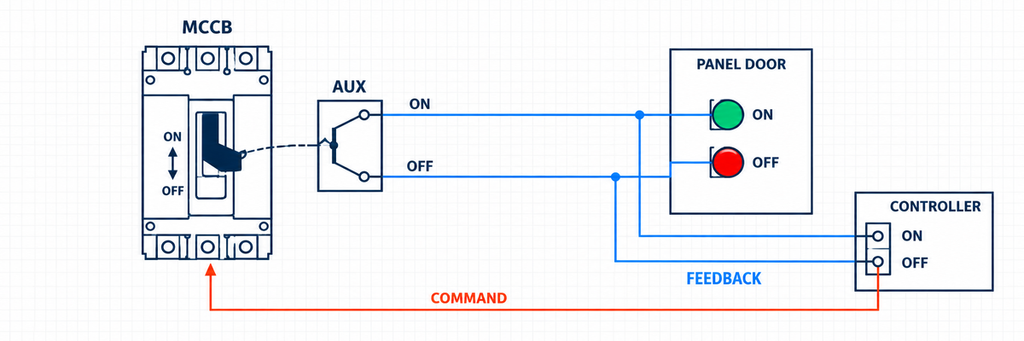
MCCB auxiliary contact providing separate ON and OFF position feedback to panel lamps and a controller.This is useful wherever the breaker is not beside the operator: distribution boards, machine panels and building-services equipment are examples. The application determines whether one output is enough or whether several circuits need separate contact paths.
The limitation is just as practical. If the breaker opens, a position contact does not explain whether someone switched it off, a release operated or a protection function caused a trip. If that distinction matters to the operator, add the appropriate trip information instead of trying to infer the cause from position.
When a Separate Alarm Contact Is Worth Specifying
An alarm contact is useful when someone must be notified of a trip, especially when equipment is unattended. Its purpose is to separate a trip event from an ordinary operating-state display.
A building-management system, for example, may need a trip notification so maintenance can investigate a stopped feeder. An OFF indication alone cannot establish that requirement: the feeder might have been deliberately switched off for service.
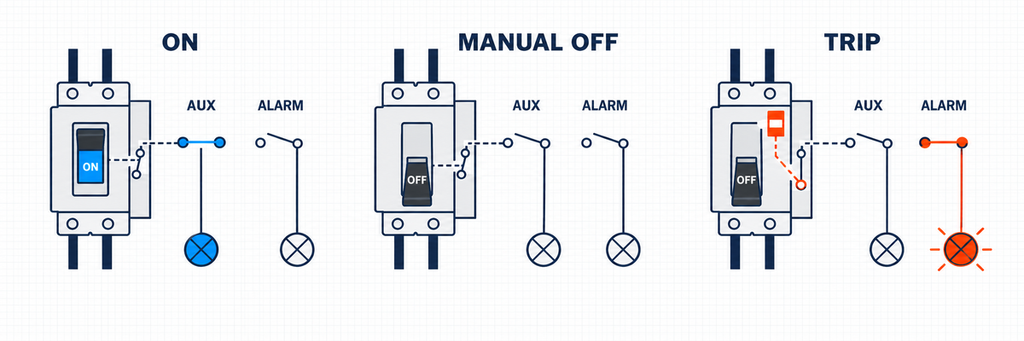
Comparison of MCCB ON, manual OFF and trip states showing when auxiliary and alarm contacts operate.Choose the alarm by the events it must report. A general trip contact can include operation of a release or test mechanism as well as a protection trip. An electrical-protection-specific contact is the more appropriate choice when the required message is specifically that the breaker’s protection operated.
A general alarm also does not normally identify the exact cause. If the application needs separate overload and short-circuit information, use the indications or communication options available from the protection system. Do not label every general trip output “short circuit.”
Decide what should happen after reset. A contact can return to its reset state while the breaker remains open. If the operator must see that a trip occurred earlier, the monitoring system can retain an event message until acknowledgement. Mechanical reset, clearing a screen message and closing the breaker should remain separate actions in that design.
Choose the Feedback Around the Application
The following examples are illustrative requirements, not reported customer installations. They show how the same two accessory types serve different jobs without making every panel specification more complicated.
A local panel needs a clear ON and OFF display
A panel builder needs lamps on the enclosure door so an operator can see the breaker’s position. Specify position feedback with the contact arrangement required by the indicator circuit. An alarm contact is additional only if the operator also needs a distinct trip indication.
Describe the displayed states before selecting the outputs. One circuit may need a closed-position signal, while another needs an open-position signal. A changeover arrangement can offer alternative paths, but the final lamp circuit still depends on its supply and the selected contact diagram.
An unattended feeder needs a trip notification
A facilities team needs an alert when a feeder trips outside working hours. Specify an alarm contact whose event coverage matches that alert. Add position feedback if the monitoring screen must also show the breaker state.
Here, a separate notification avoids treating every planned shutdown as a fault callout. The alarm should describe what is known, such as “breaker trip,” while more detailed diagnosis comes from the protection indications and subsequent investigation.
A remotely operated breaker needs status and trip information
An automated panel needs to confirm the result of an operating command and notify staff of a trip. Specify both position and trip feedback, using compatible separate modules or a supported combined accessory.
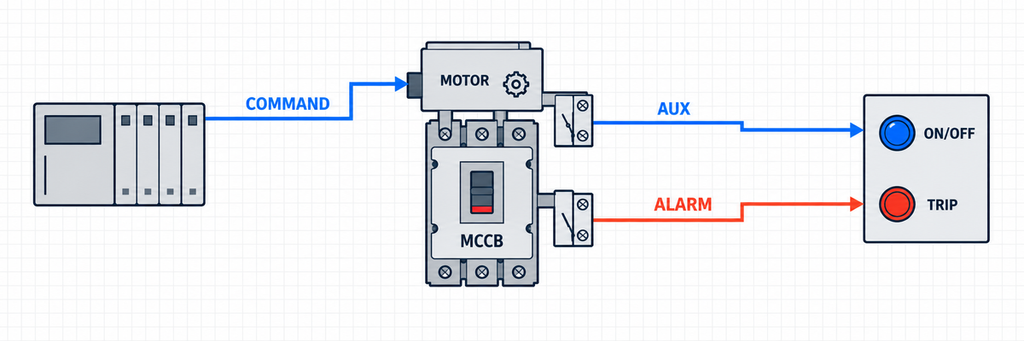
Motor-operated MCCB using independent auxiliary position and alarm trip feedback signals.Give each output its own role. Position confirms the reported operating state; trip feedback supplies the event information. The MCCB motorized operating mechanism guide explains the operator that moves or resets the breaker. It is a separate component from the contacts used to monitor it.
Understand the Contact Arrangement Before Connecting It
Once the function is chosen, identify the available contact paths. NO, NC and changeover describe electrical connections, not whether the accessory is an auxiliary or alarm type.
A normally open path is open in its specified reference condition; a normally closed path is closed in that condition. A changeover contact has a common terminal that switches between two alternative paths. Read the drawing’s reference state before deciding what each terminal pair represents.
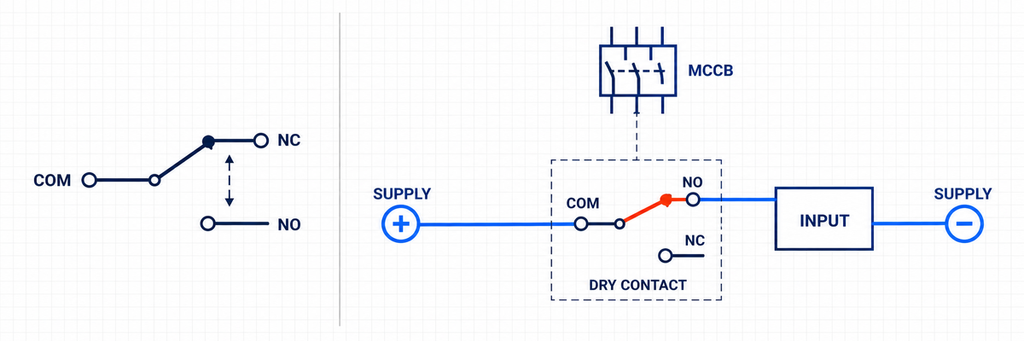
MCCB changeover contact and externally powered dry-contact controller input circuit.This matters because “contact closed” and “breaker closed” are not the same statement. A particular signalling path may conduct when the MCCB is OFF so that an OFF lamp can illuminate. Another path may conduct when the breaker is ON.
A description such as 1 NO + 1 NC tells you about the contact arrangement. It does not, by itself, establish whether the paths report position or trip. Likewise, extra contacts that all follow position cannot replace an independent alarm function.
A dry contact switches a supplied circuit; it does not generate the signal voltage. An indicator lamp or controller input needs a suitable external circuit. For an electronic input, the contact path, input common and signal supply must match the receiving device’s wiring requirements.
Keep different-voltage circuits separate. The two throws of one shared-common changeover contact are not two electrically isolated outputs. Where separate circuits are required, select suitable independent poles or an appropriately designed interface.
What to Match When Selecting or Replacing an Accessory
Function is the first selection, but the accessory must also fit the actual breaker and signal circuit. A useful specification connects the required indication to the mechanical interface and the electrical duty.
| Selection detail | What to establish | Why it matters |
|---|---|---|
| Breaker series and frame | The complete breaker model and accessory location | Equal ampere ratings do not establish the same mounting interface |
| Operating function | Position, general trip or protection-specific indication | The wrong function gives the wrong information |
| Contact arrangement | Required paths, common terminals and independent outputs | The wiring must match the lamps, relays or controller inputs |
| Switching duty | Signal voltage, current and load type | A rating applies to its stated electrical conditions |
| Available mounting space | Existing releases, operators and contact modules | Accessories can share or compete for installation positions |
For a replacement, start with the original accessory reference and the breaker nameplate. Check the mounting features, actuating parts and terminal identification. A module can look similar without following the same mechanism or using the same terminals.
Connection style matters during replacement too. An accessory with flying leads and one with terminal connections can provide the same type of indication while requiring different routing and termination work. Check the available space, conductor connections and the installed drawing before treating them as the same configuration. This is particularly useful when a panel must retain its existing cable arrangement.
The mechanical engagement is part of the function, not just a convenience for installation. If the contact is not correctly operated by the breaker, even a correctly wired signal circuit can report the wrong state. Do not modify an accessory or force it into place to compensate for an incorrect match.
MCBs also use auxiliary and alarm contacts, but similar functions do not make their accessories interchangeable with MCCB modules. The comparison of MCB, MCCB, RCCB and RCBO devices explains the breaker families; accessory fit still belongs to the specific configuration.
The circuit breaker accessories guide provides the broader relationship between feedback contacts, releases and other accessories. For auxiliary and alarm selection, concentrate on the required output and the breaker it must work with.
Check Both the Upper and Lower Electrical Ratings
The feeder rating does not describe the accessory’s switching capability. A breaker carrying a large load can have a feedback contact connected to a small electronic input. A different panel may use that contact to operate an indicator or a relay coil.
Check the rated operational current at the actual signal voltage and load duty. AC and DC ratings can differ, and switching an inductive coil is not the same duty as switching a resistive load. A thermal-current figure should not be treated as a switching rating for every condition.
Consider how the signal is used over time. A position contact may change during every scheduled opening and closing, whereas a trip contact may operate much less frequently. If the application involves frequent switching, compare the declared electrical endurance under the intended load, rather than selecting only by a mechanical operation count. The required service duty belongs in the contact choice.
Where minimum switching conditions are specified, check those too. An electronic input may draw too little current for a standard contact’s declared operating range, making a suitable low-level version relevant. A large maximum-current number alone does not settle that choice.
Use the receiving equipment’s input specifications, including the lowest expected signal current, rather than guessing from the breaker size. Where the contact cannot directly satisfy the load, an appropriately selected interface can separate the monitoring duty from the load-switching duty.
Finally, keep the main-circuit voltage separate from the monitoring supply. A breaker on a higher-voltage feeder can be monitored through a suitable low-voltage control circuit. Use the accessory and input ratings to choose that circuit, not the feeder voltage printed on the breaker.
Make Sure the Installed Signal Matches the Intended Message
Verification should follow the information the panel is supposed to provide. Qualified personnel should use the manufacturer’s permitted methods and the installation’s approved safe procedure.
For position indication, check ordinary opening and closing against the terminal diagram and the displayed state. For an alarm, use the permitted trip test for the required function. A mechanical test button may exercise a general trip path without exercising every protection-specific output.
Check the reset condition as well. The panel should not show a closed breaker merely because a trip message has cleared. If an alarm is retained in software, make its acknowledgement behavior clear to the operator.
When the displayed state is wrong, work through the signal path rather than replacing parts immediately. Establish whether the accessory follows the mechanism, whether its terminals change as expected, and whether the receiving circuit interprets that change correctly.
Loss of monitoring power or a broken conductor can also remove an input signal. Where the application needs to identify unavailable feedback, include that behavior in the control design. An inactive input is not automatically a healthy condition.
Never create a live overload or short circuit to demonstrate an alarm. Position and trip indications also do not prove voltage absence; safe isolation requires the applicable isolation and verification procedure.
For IEC-oriented specifications, IEC 60947-2:2024 supplies the circuit-breaker product context, while IEC 60947-5-1:2024 covers electromechanical control-circuit devices within its scope. Product conformity and acceptance of a specific accessory arrangement require the relevant product evidence, not merely a reference to a standard.
Frequently Asked Questions
Can an auxiliary contact be used to trigger a warning?
Yes, if the intended warning is that the breaker is in a particular position. If the message must specifically identify a trip, use the appropriate trip function rather than calling every open position a fault.
Does an alarm contact detect a fault by itself?
No. The alarm contact reports operation of its assigned mechanism. Detection and protective interruption belong to the breaker and protection system; a general trip signal may also include release or test operation.
Are auxiliary and alarm contacts always separate modules?
No. Some breaker configurations support combined assemblies. Check that the selected assembly provides the required independent position and trip outputs, rather than relying on the number of terminals or the word “combined.”
Does resetting a tripped breaker restore the supply?
Reset and closing are separate actions. The breaker can remain open after its trip indication clears. Confirm the cause and follow the permitted return-to-service procedure before reclosing.
Matching the Right Accessory to the Job
JUTRION manufactures auxiliary contacts, alarm contacts and other breaker accessories for its own breaker combinations and replacement applications across multiple breaker platforms. The useful starting point is your required indication and the actual breaker model. If you need help identifying a matching option, send the breaker nameplate or original accessory reference with clear photographs. Replacement options are supplied as JUTRION products, with the function and installation interface matched to the application.
Technical References
- IEC 60947-2:2024 — Low-voltage switchgear and controlgear — Part 2: Circuit-breakers
- IEC 60947-5-1:2024 — Control circuit devices and switching elements — Electromechanical control circuit devices
- Schneider Electric — GV5PB/GV6PB documentation: Auxiliary Contact Functions, an original-manufacturer reference example
